Compiling GW-BASIC and drawing in Jupyter
GW-BASIC 2026 compiles BASIC listings to native executables and runs BASIC cells in Jupyter notebooks. Its compiler and notebook kernel reuse the interpreter's machinery in different ways. The generated C and a notebook drawing show how that shared implementation behaves.
Microsoft published its GW-BASIC sources in 2020: 8088 assembly dated 10 February 1983. GW-BASIC 2026 is a C11 reimplementation that uses that assembly as a reference. It also adds an ahead-of-time compiler and a Python kernel for Jupyter.
The examples below use the released v0.18.2 source and gwbasickernel 0.1.0. They were run on Linux x86-64 for this article. The repository's main branch continues to change; the commands deliberately select the release.
Start with a listing you can inspect
The source includes this small table of squares in examples/squares.bas:
10 REM GW-BASIC 2026: one program for DOS and native compilation
20 PRINT "N";TAB(8);"N SQUARED"
30 FOR N=1 TO 8
40 PRINT N;TAB(8);N*N
50 NEXT N
60 END
On Linux, install Git, the C development tools (GCC, Make and C library headers), CMake 3.13 or later and pkg-config. Python 3.10 or later, with virtual-environment support, is needed for the notebook section. PulseAudio development files are optional for these silent examples. Then build the release:
git clone --branch v0.18.2 --depth 1 https://github.com/evvaletov/gw-basic-2026.git
cd gw-basic-2026
cmake -S . -B build -DCMAKE_BUILD_TYPE=Release
cmake --build build --parallel 4
Run the listing through the interpreter and compile the same file:
build/gwbasic examples/squares.bas < /dev/null > build/interpreted.txt
cp examples/squares.bas build/squares.bas
build/gwbasic-compile build/squares.bas -c --keep-c --runtime .
build/squares > build/native.txt
cmp build/interpreted.txt build/native.txt
cat build/native.txt
cmp exits successfully without printing anything when the files match. That comparison passed byte for byte in the article run, including BASIC's spaces around positive numbers. The last row contains 8 and 64. The complete output is available alongside this article.
The compiler leaves two useful files: build/squares, the executable, and build/squares.bas.c, its generated C source. The --runtime . argument points it at the checkout containing the headers and built runtime library. These commands assume you remain in the repository root.
A native executable with BASIC bookkeeping
The compiler starts by calling the same tokeniser used by the interpreter. An analysis pass collects variables, line targets and other program information. Code generation then emits C, and -c invokes the gcc command to build an executable linked with libgwrt.a.
For this listing, the generated code declares N as a C float, matching BASIC's default single-precision variable type. Line numbers become labels such as L_30 and L_50. The FOR statement records the loop variable, limit, step and continuation in the runtime. NEXT N becomes:
  _gw_loop = gwrt_for_next(&var_N_sng);
  if (_gw_loop >= 0) goto _gw_for_dispatch;
The dispatch target jumps back to the generated loop body. Keeping an explicit loop stack matters because BASIC can jump between numbered lines and has GOSUB frames. A straightforward replacement of every FOR with a C for loop would miss those relationships. The runtime records the subroutine depth of each active loop; NEXT searches within that frame, and RETURN discards its unfinished loops.
In this example, PRINT with TAB is delegated to the shared statement handler. Its token bytes are embedded in a small array, and the generated code calls gw_exec_stmt(). Before printing line 40, it copies the current N into the shared variable store. You can see the entire result in squares.bas.c.
This is how the compiler can reuse BASIC's formatting, file operations and graphics. A native executable still contains substantial runtime support, including interpreter machinery for delegated operations. Simple expressions and control flow can be generated as C, while statements that need shared behaviour keep using it.
Types introduce a similar boundary. An initial DEFINT A-Z can establish types before code generation. A conditional or later DEFSTR A has to take effect when execution reaches it. Those programs use tagged values and shared storage while retaining generated branches and line labels. The implementation is in the release's analysis pass, code generator, dynamic-type generator and runtime.
A notebook keeps the interpreter alive
The Jupyter kernel takes another route through the same implementation. It runs a persistent gwbasic subprocess, with pipes for input and output. A cell sends BASIC text to that process. Variables and stored program lines remain available to later cells.
From the checkout, create an environment and install the published kernel:
python3 -m venv .venv
. .venv/bin/activate
python -m pip install gwbasickernel==0.1.0 jupyterlab
gwbasickernel-install --sys-prefix
Download the executed example notebook and save it as build/article.ipynb. Start JupyterLab from the same shell:
GWBASIC="$PWD/build/gwbasic" jupyter lab build/article.ipynb
The kernel package does not include the native interpreter; GWBASIC supplies its absolute path. Select the GW-BASIC 2026 kernel if Jupyter asks. The first two code cells demonstrate retained state:
A=6
PRINT A*7
The second cell prints 42. Numbered lines behave as they do at the BASIC prompt: entering them stores a program, and RUN executes it. The graphics cell starts with NEW, which clears both the stored program and variables, including A.
To detect when a cell has finished, the kernel appends a PRINT command that emits a sentinel containing control characters around GWDONE. It reads until that marker appears and removes the marker from the output. This is a small protocol over a normal interpreter session. A program deliberately printing the same marker could confuse it; a program that never finishes reaches the kernel's timeout, which terminates the subprocess and loses its state. %timeout changes that limit, and %reset starts a fresh interpreter.
Sixel reaches the browser as PNG
The graphics program is examples/circles.bas, followed by RUN in the notebook:
10 SCREEN 1
20 LINE (0,0)-(319,199),1,B
30 FOR R=10 TO 90 STEP 10
40 CIRCLE (160,100),R,2
50 NEXT R
60 LINE (0,100)-(319,100),3
70 LINE (160,0)-(160,199),3
80 END
SCREEN 1 selects a 320 by 200 pixel framebuffer. LINE and CIRCLE modify that buffer. On the POSIX output path, the graphics encoder serialises it as Sixel: palette definitions and bands of six vertical pixels, with repeated runs compressed.
The kernel recognises those Sixel sequences in the output stream, decodes them to RGBA pixels and encodes PNG data. It sends an image/png display message to Jupyter. The browser therefore needs only ordinary image support. Displaying the POSIX build's graphics directly in a terminal requires Sixel support.
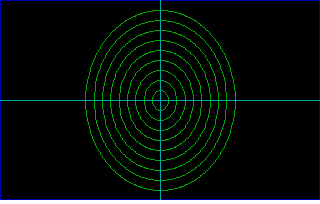
The image above is the final frame extracted from the executed notebook. The notebook retains intermediate drawing frames as well. Sixel's six-row bands leave padding at the bottom of the decoded image; the BASIC drawing area remains 320 by 200 pixels.
The colours also show a compatibility gap. Version 0.18.2 maps attributes 1, 2 and 3 to blue, green and cyan here. The original SCREEN 1 defaults are light cyan, light magenta and high-intensity white, as listed in Microsoft's reference manual, page 225. The displayed image preserves the release's output.
The graphics encoder and kernel decoder are small enough to follow from the drawing buffer to the notebook message. The kernel runs the interpreter for these cells; it does not compile them through the C backend.
What these examples establish
The article run checked matching interpreter and native output, state retained across notebook cells, and PNG output from the graphics program. The downloadable notebook contains the outputs, and the verification record lists the source revision, tool versions and file hashes.
Compatibility still has limits. Arithmetic uses IEEE 754 rather than the original Microsoft Binary Format internally; MBF conversion is used at binary file boundaries. Compiled timer and key event handlers are unsupported. Hardware access includes emulated features and stubs, described in the language reference. Matching these small examples does not establish compatibility with every old program.
To investigate a particular listing, keep its input and expected output, compare the interpreter with its compiled version, and inspect the generated C when they diverge. Reproducible reports can go to the project's issue tracker. The release downloads and project documentation provide the other installation routes and examples.